


Evaluating email archiving pricing requires looking well beyond the advertised monthly subscription rate to understand the true financial commitment an enterprise is making. On the surface, many vendors present straightforward, predictable quotes designed to clear initial procurement hurdles. However, once deployment begins, complex licensing rules, unexpected data ingestion caps, and punitive data egress charges can drastically inflate operating expenses over a multi-year contract.
For IT directors, compliance officers, and procurement teams at the bottom of the purchasing funnel, selecting a data archiving platform is not merely a software purchase. It is a long-term infrastructure and governance commitment. From managing inactive mailboxes for departed staff to accounting for legal hold storage, eDiscovery exports, and legacy PST file imports, every operational detail carries a potential price tag. By conducting a rigorous cost analysis before signing a service agreement, enterprise decision-makers can uncover hidden fees, prevent vendor lock-in, and secure a compliant, scalable archiving strategy that aligns with their long-term IT budget.
Understanding email archiving pricing models: per-user vs. per-gigabyte
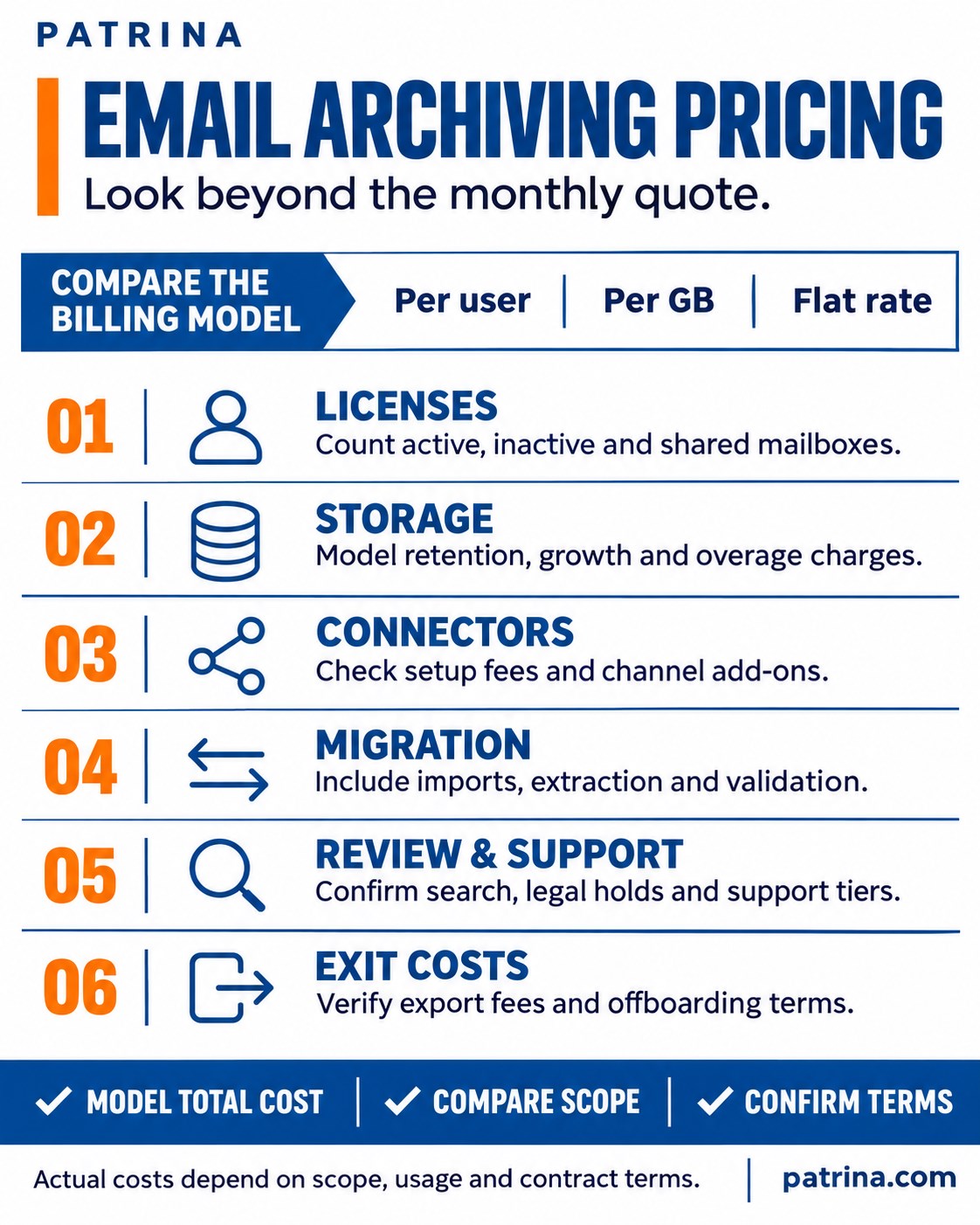
The foundational structure of any email archiving cost comparison starts with how a vendor meters consumption. Across the enterprise software market, providers generally rely on three primary frameworks: per-user licensing, volume-based storage pricing, and flat-rate enterprise agreements. Understanding the mechanics of these email archiving pricing models is essential because a structure that looks economical during year one can become prohibitively expensive as data volumes compound over a seven-to-ten-year retention period.
Comparing flat-rate, per-user (PUPM), and tiered storage plans
Most modern cloud platforms anchor their quotes around a per-user per-month (PUPM) model. Under this structure, the cloud email archiving cost per user typically ranges from $2 to $12 per month depending on the feature set, security certifications, and compliance tier. While PUPM simplifies initial headcount budgeting, it rarely exists in isolation; most vendors pair seat-based fees with strict storage quotas per user (such as 50 GB or 100 GB pooled across the organization).
Conversely, per-gigabyte or tiered storage plans calculate billing strictly based on the volume of compressed or uncompressed data ingested into the repository. While this eliminates seat-counting headaches, it introduces extreme volatility. Because email attachments, rich-media files, and automated system notifications grow exponentially year over year, a volume-based email archive storage pricing model punishes organizations for normal business communication growth.
Flat-rate enterprise plans offer a third alternative, bundling unlimited storage and a high ceiling of user seats into a single annual fee. While flat-rate contracts deliver predictable budgeting, they are typically reserved for large enterprises and often include strict fair-use clauses that trigger automatic tier upgrades if your ingestion rate exceeds projected baselines.
| Pricing model | How it is billed | Primary advantage | Biggest financial risk | Best fit for |
|---|---|---|---|---|
| Per-user per-month (PUPM) | Fixed fee per active mailbox, often paired with pooled storage caps. | Easy to align with HR headcount and departmental budgets. | Paying full license fees for departed employees and storage overages. | Organizations with low employee turnover and moderate email volume. |
| Per-gigabyte / tiered storage | Billed by total data volume stored, often in escalating storage blocks. | No penalty for high employee turnover or seasonal contractors. | Unpredictable budget spikes as historical data accumulates over years. | High-turnover industries with low attachment and file-sharing volume. |
| Flat-rate enterprise | Single annual or multi-year contract covering set user/data thresholds. | Maximum cost predictability and simplified procurement approvals. | Overpaying upfront if actual adoption or data growth lags projections. | Large enterprises with stable growth and strict compliance mandates. |
Read more: Archive vs. delete emails: what’s the difference and which is better?
Choosing the right model for your enterprise growth curve
Selecting the optimal licensing model requires modeling your organization’s trajectory across two distinct axes: headcount growth and data accumulation.
If your company is scaling rapidly through hiring or mergers and acquisitions, a pure PUPM model will scale linearly with your workforce, making unit economics easy to forecast. However, if your organization operates in a data-intensive sector—such as financial services, healthcare, or engineering—where employees routinely exchange large CAD files, spreadsheets, and PDFs, your email archive storage pricing will outpace headcount growth. In those environments, an unlimited-storage PUPM plan or a custom flat-rate tier prevents storage overage fees from eroding your IT margins.
Uncovering hidden vendor fees and egress charges
The gap between a vendor’s initial proposal and your actual year-three invoice is almost always driven by ancillary fees buried in the master services agreement (MSA) or acceptable use policy. When evaluating the hidden costs of email archiving, procurement teams must scrutinize what happens when data moves into, out of, or across the platform.
Identifying egress and data retrieval penalties
One of the most aggressive forms of vendor lock-in in cloud archiving is the imposition of data egress fees. Many cloud archiving providers make it free and effortless to ingest data into their proprietary repositories, only to charge substantial fees when you need to extract it.
Email archiving data extraction fees typically surface in two scenarios:
- Routine litigation and audits: When legal counsel or regulators request a bulk export of communications spanning several years, some vendors charge per-gigabyte export fees or bill for professional services to compile the archive.
- Contract termination and offboarding: If you decide to switch providers at the end of a contract term, extracting 10 terabytes of historical email in standard PST or EML formats can trigger massive egress penalties—sometimes costing tens of thousands of dollars—effectively holding your corporate history hostage.
Before signing any contract, demand written confirmation of export speeds (e.g., gigabytes per day) and verify that bulk data extraction is included at zero additional cost upon termination.
Spotting hidden costs for API integrations and advanced features
Base-tier email archiving licensing costs frequently cover only core SMTP journaling for standard email platforms like Microsoft 365 or Google Workspace. Modern enterprises, however, rarely communicate via email alone. When you attempt to capture collaboration channels, mobile SMS, or voice logs, add-on fees multiply rapidly:
- API integration fees: Connecting third-party connectors for Microsoft Teams, Slack, Zoom, Bloomberg, or WhatsApp often incurs separate per-user, per-connector surcharges.
- eDiscovery email archiving fees: Basic keyword search is usually standard, but advanced eDiscovery email archiving fees—such as proximity searching, optical character recognition (OCR) for scanned attachments, legal hold workflows, and redaction tools—are frequently gated behind expensive "Compliance" or "Enterprise Plus" tiers.
- Support level agreements (SLA): Standard plans may restrict your IT team to email-only ticketing with 24-to-48-hour response windows. Upgrading to 24/7 phone support, dedicated account management, or guaranteed sub-hour response SLAs often adds 15% to 25% to the annual contract value.
How inactive mailbox retention impacts total archiving costs
A critical blind spot in enterprise email archiving cost modeling is how a vendor treats inactive user mailboxes. In any organization, employees resign, retire, or transition roles, yet regulatory frameworks and corporate governance policies dictate that their historical communications remain immutable and searchable for years.
Managing licensing for departed employees
Under standard Microsoft 365 or Google Workspace licensing, administrators can convert a departed employee’s mailbox into an inactive or shared mailbox to reclaim the primary productivity license. Many third-party archiving vendors, however, do not mirror this flexibility.
Some providers charge the exact same full PUPM rate for an inactive mailbox as they do for an active employee. Over a seven-year retention period, an organization with a 15% annual turnover rate will eventually pay for more inactive archive licenses than active employees. Worse yet, if your contract locks you into a minimum seat count, reducing active headcount during a restructuring will not lower your archiving bill.
Strategies to prevent unnecessary license inflation
To prevent departed staff from silently inflating your email archiving licensing costs, apply the following procurement controls during vendor negotiations:
- Negotiate free inactive storage: Insist on a contractual clause that allows unlimited retention of inactive or departed user mailboxes at zero additional seat cost, provided no new mail is being journaled to those addresses.
- Verify auto-deprovisioning sync: Ensure the archiving platform integrates directly with Active Directory or Entra ID (Azure AD) so that when an employee is disabled in your identity provider, their license automatically converts to an inactive state without manual intervention.
- Audit shared and service mailboxes: Clarify how system accounts (such as info@, billing@, or support@) and distribution lists are metered. Some vendors count every journaling target as a billable user seat unless explicitly exempted in the contract.
Calculating TCO: cloud vs. on-premise email archiving
Determining whether to deploy a cloud-native SaaS archive or an on-premise appliance requires a comprehensive email archiving total cost of ownership (TCO) calculation. While on-premise hardware avoids recurring SaaS subscriptions, the operational overhead of maintaining local infrastructure often tips the financial balance in favor of the cloud over a five-year horizon.
Factoring infrastructure and maintenance in on-premise archiving
When evaluating on-premise vs cloud email archiving cost, decision-makers must look past the initial capital expenditure (CapEx) of the server hardware or virtual appliance software license. On-premise archiving carries substantial recurring operational expenses (OpEx):
- Storage expansion and storage tiering: As email databases grow, IT teams must continuously purchase high-availability SAN/NAS storage arrays, configure storage tiering to move older records to slower disks, and maintain immutable WORM (write-once-read-many) storage media to satisfy audit requirements.
- Redundancy and disaster recovery: A compliant archive cannot rely on a single point of failure. You must fund secondary replication hardware, off-site backup storage, and redundant power and cooling systems.
- Database administration and patching: On-premise archives run on complex underlying databases (such as SQL Server or Elasticsearch) that require ongoing licensing, security patching, index rebuilding, and dedicated systems administrator hours.
- Hardware refresh cycles: Every three to five years, physical servers reach end-of-life, forcing a capital-intensive hardware refresh and internal data migration.
Evaluating subscription efficiency in cloud-based solutions
Cloud-based archiving shifts spending from unpredictable CapEx spikes to predictable OpEx subscriptions. By offloading infrastructure management to the vendor, organizations eliminate server hardware purchases, data center footprint costs, and routine maintenance labor.
However, cloud TCO efficiency depends heavily on avoiding the consumption traps outlined earlier. A well-negotiated cloud contract—featuring transparent PUPM pricing, pooled or unlimited storage, zero-cost inactive mailboxes, and guaranteed SLA uptime—consistently delivers a 30% to 45% lower five-year TCO than an equivalent on-premise deployment.
| TCO cost category | On-premise email archiving | Cloud-based email archiving (SaaS) |
|---|---|---|
| Upfront investment | High CapEx (servers, storage arrays, perpetual software licenses). | Low OpEx (initial onboarding and implementation costs only). |
| Storage scaling | Manual procurement of new disks, SAN expansion, and storage tiering. | Elastic cloud scaling; watch for vendor storage quotas and overages. |
| IT labor & maintenance | High (OS patching, database tuning, backup verification, hardware swaps). | Minimal (vendor manages uptime, indexing, and infrastructure security). |
| Disaster recovery | Expensive secondary site infrastructure and replication bandwidth. | Built-in geo-redundancy across multiple cloud availability zones. |
| 5-year cost predictability | Vulnerable to sudden hardware failures and mid-cycle storage upgrades. | High, provided egress, API, and inactive user terms are locked in writing. |
Unexpected expenses during legacy email archive migration
Switching from an aging on-premise archive (such as Enterprise Vault or SourceOne) or consolidating data after a corporate acquisition introduces one of the most overlooked budget items: email archive migration cost. Moving years of historical records into a new system is rarely a simple drag-and-drop operation.
Accounting for PST file imports and data extraction fees
Legacy data migration involves two distinct cost centers: extracting data from the old repository and ingesting it into the new one.
If your legacy data is trapped in proprietary formats, you may need specialized third-party migration utilities to convert items into standard EML or PST files without corrupting metadata. Furthermore, many cloud vendors charge separate PST file import fees—either billing per gigabyte of historical data ingested or requiring you to purchase high-speed ingestion bandwidth packs to avoid throttling.
At a standard free ingestion rate of 10 to 20 GB per day, migrating a 5 TB legacy archive can take nearly a full year. To finish the migration before your old vendor’s renewal deadline, you may be forced to pay steep expedited ingestion fees.
Budgeting for chain of custody validation during transfer
For regulated organizations, moving historical records carries strict legal obligations. If an email’s metadata, timestamp, or attachment structure is altered during transfer, the record may be deemed inadmissible in court or trigger regulatory penalties.
Consequently, implementation costs must account for automated reconciliation and chain of custody reporting. This process verifies that 100% of source items were successfully transferred, deduplicated, and cryptographically hashed in the destination archive. Budgeting for dedicated migration engineering support ensures that audit trails remain unbroken from start to finish.
Regulatory compliance overhead: SEC, FINRA, and HIPAA pricing impacts
Industry regulations directly dictate the technical architecture—and therefore the price—of an archiving solution. Standard corporate archiving is vastly different from compliant financial or healthcare archiving, and failing to account for regulatory compliance overhead will result in immediate budget shortfalls during procurement.
How SEC Rule 17a-4 and FINRA requirements drive up costs
For broker-dealers, investment advisors, and financial institutions, SEC compliance email archiving price structures and FINRA email archiving vendor costs reflect stringent legal mandates, specifically SEC Rule 17a-4 and FINRA Rule 4511.
To satisfy these rules, the archiving platform must provide:
- Immutable WORM storage: Records must be preserved in a non-rewritable, non-erasable format for a mandatory minimum retention period (typically six years for broker-dealers, with the first two years in an easily accessible location). Maintaining verifiable WORM compliance requires specialized cloud storage locks that cost more than standard object storage.
- Supervisory review workflows: FINRA Rule 3110 requires firms to actively supervise electronic communications. Licensing built-in random sampling, lexicon-based policy flagging, escalation queues, and auditable reviewer sign-offs adds significant per-user surcharges to base archiving plans.
- Designated third-party (D3P) or alternative attestation: Meeting SEC technical attestation requirements often involves additional vendor compliance fees or third-party audit documentation charges.
Similarly, healthcare organizations subject to HIPAA must budget for business associate agreements (BAAs), end-to-end encryption key management (BYOK), and granular role-based access controls, all of which typically sit in higher-priced enterprise tiers.
Discover our investment advisor archiving solution to learn more about compliant recordkeeping.
How to negotiate email archiving contracts for predictable budgeting
Securing a scalable email archive pricing agreement requires shifting leverage back to your procurement team before contracts are executed. Vendors expect enterprise buyers to negotiate, and locking in protective terms upfront eliminates surprises at renewal time.
Key contractual clauses to demand before signing
When reviewing your final order form and MSA, ensure the following protections are explicitly documented:
- Multi-year price locks and renewal caps: SaaS vendors routinely build 7% to 12% automatic annual price uplifts into renewal clauses. Negotiate a multi-year rate lock (3 to 5 years) and cap any subsequent renewal increases at 3% or the Consumer Price Index (CPI), whichever is lower.
- Zero-cost data egress and offboarding SLA: Stipulate in the MSA that upon contract expiration or termination, the vendor will export your complete archive in a non-proprietary format (PST/EML) at zero per-gigabyte egress cost, with a guaranteed minimum daily export throughput.
- True-forward vs. true-up licensing: Avoid punitive mid-year "true-up" penalties if you hire seasonal staff or complete a small acquisition. Negotiate an annual "true-forward" model where seat counts are reconciled once per year at your pre-negotiated unit rate.
- All-inclusive storage and inactive mailboxes: Bundle pooled storage with generous overage buffers, and explicitly define departed employee mailboxes as non-billable archive seats.
- Clear scope on implementation and migration: Require a fixed-fee statement of work (SOW) for legacy data migration, PST file import fees, and connector setup so professional services hours cannot spiral out of control.
Protect your budget with transparent, compliant archiving
Evaluating email archiving pricing goes far beyond comparing sticker prices on a vendor’s website. By scrutinizing data egress fees, modeling the long-term impact of inactive user mailboxes, accounting for legacy data migration, and factoring in regulatory compliance overhead, your organization can avoid the costly traps that derail enterprise IT budgets.
Don’t let hidden egress fees or license markups compromise your IT budget. Patrina delivers enterprise-grade, compliant archiving with transparent structures tailored to your organization. Request a demo.